Work with data
Items and data structure
How data flows between nodes as items, and how to read it.
Data moves between nodes as a list of items. Each item is an object with a json field holding your data:
[
  { "json": { "name": "Asha", "amount": 120000 } },
  { "json": { "name": "Juma", "amount": 45000 } }
]
One item at a time
Most nodes run once per item. If a node receives 10 items, an HTTP Request node makes 10 requests and a Slack node sends 10 messages. This is usually what you want: one order, one message.
When you need to act on all items together, use Aggregate or Summarize, or a Code node in Run once for all items mode.
Reading data
In any node setting, an expression like {{ $json.name }} reads a field from the current item. {{ $("Node name").json.field }} reads from an earlier node.
Seeing the data
Open a node to see its input and output. Switch between the table and JSON views. You can drag a field from the input onto a setting to insert the matching expression.
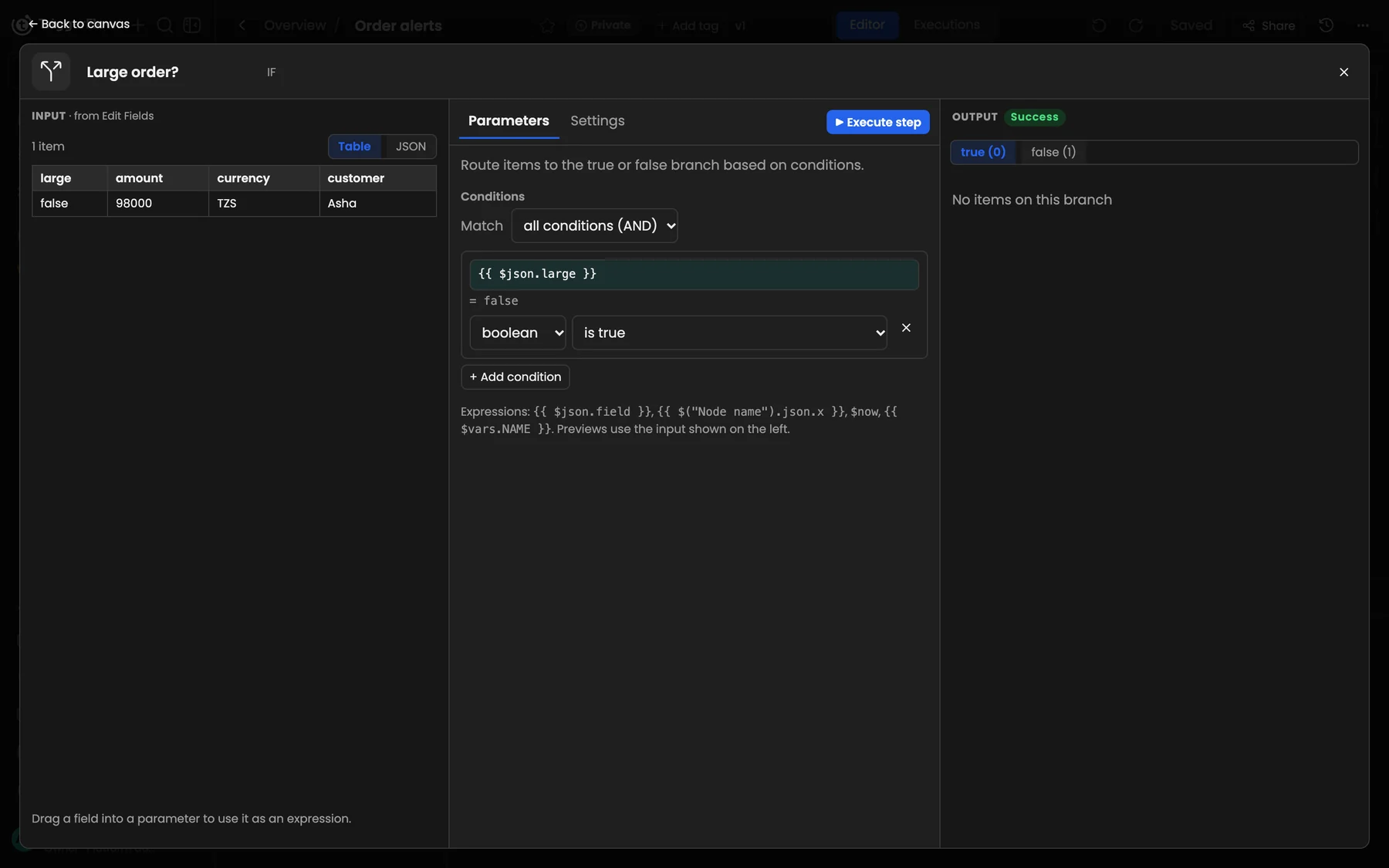
Input on the left, settings in the middle, output on the right.
Lists inside items
If an item contains an array (for example lines: [...] on an order), use Split Out to turn each element into its own item, and Aggregate to put them back together.
Empty output
If a node outputs no items, the nodes after it don't run. An IF node with no matching items simply leaves that branch empty.